
A free Divvy alternative for Mac
If you like arranging windows by drawing on a grid, Tidy Screen works the same way, for free.
What Divvy does
Divvy by Mizage popularized a simple idea: open a small grid, drag across part of it, and the focused window fills that part of the screen. It also supports keyboard shortcuts for preset layouts. Divvy is a paid app with a free trial, and it runs on both Mac and Windows.
How Tidy Screen compares
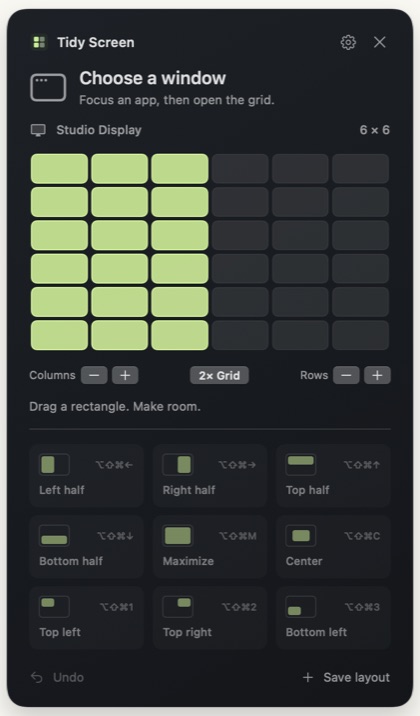
- The same grid idea. Open the grid, drag a rectangle, and release. A live preview shows where the window will go before you let go.
- Free. Tidy Screen is free to download and use, with no account required.
- A flexible grid. Use anywhere from 1 to 20 columns and rows, or tap Option while the grid is open to subdivide it.
- Saved layouts and global shortcuts. Save a selection, name it, and give it a shortcut that works in any app.
- Multiple displays. Each display gets its own grid, and you can send a window to the next display.
- Gaps, margins, and undo. Leave space between windows and around the screen edges, and undo a placement you didn’t mean.
- Signed and notarized. Tidy Screen is signed with Developer ID, notarized by Apple, and receives signed updates.
Tidy Screen is Mac-only and needs macOS 13 or later. If you also need the same tool on Windows, or you’re on an older version of macOS, Divvy covers those cases.
Switching from Divvy
- Download Tidy Screen, drag it to Applications, and allow Accessibility access.
- Open Settings → Grid & Spacing and set the grid size you used in Divvy.
- Open Settings → Shortcuts and recreate your favorite layouts with New Layout. Choose In any app to make a shortcut global.
- Quit Divvy, or remove its shortcuts, so the two apps don’t compete for the same keys.
Weighing other options too? See Mac window managers compared.